How to stop IPL, enter CLI, boot ifs-emergency.ifs and restore ifs.root-stage2
Some MHI2/MHI2Q units become bricked at applying PATCH to rootfs in m.i.b., because of using bad/low quality SD cards. The first step before starting the recovery steps below is to make sure that SD card with the backup functions correctly.
In case you found out that SD card is bad that means you lost the backup. Then use a backup from /net/mmx/mnt/boardbook
The steps below assume you understand [MHI2/MHI2Q hardware](/MHI2 MHI2Q Harman Aisin/M.I.B. - More Incredible Bash/POG24 & BYG24 - AndroidAuto & CarPlay Widescreen Patch/Hardware MHI2/) and will describe how to stop IPL (Initial Program Loader that runs on RCC when you power on the MIB), how to boot ifs-emergency.ifs (from RCC NOR) and how to reflash RCC ifs.root-stage2.
It assumes you installed [m.i.b.](/MHI2 MHI2Q Harman Aisin/M.I.B. - More Incredible Bash/) before and have m.i.b. SD with the backup folder available
- Connect TTL adapter to UART of RCC
- Run any terminal program from the table below and connect. On the keyboard, press and hold the key combination, power the unit via quadlock and quickly press Enter.
| Program | Key Combination | |
|---|---|---|
| Putty | CTRL+ BREAK | 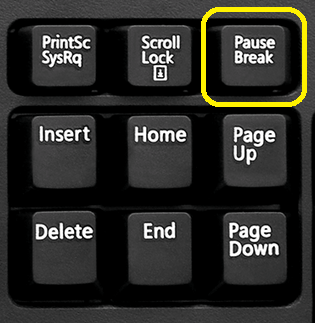 |
| MobaXterm | CTRL+ BREAK | |
| TeraTerm | ALT + B |
On the laptop keyboards where the Pause/Break button is missing you can use combos depending on the laptop manufacturer (just google it). For example on Lenovo laptops, use Fn+B combo
- On some firmwares, first you need to power on the unit and only then quickly press and hold the Ctrl+Pause key combination for about 1 second until you see the "BREAK detected" line:
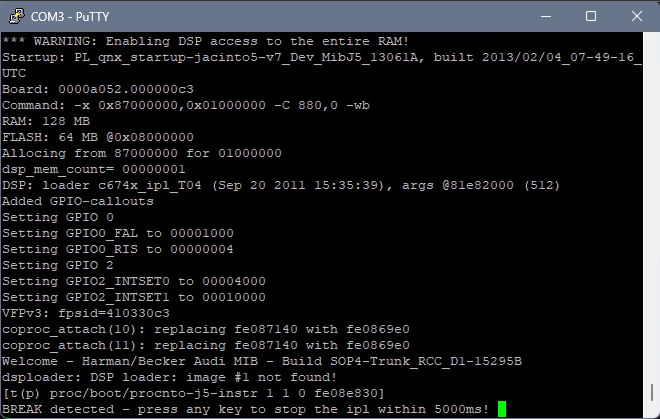
- Press any key and you should see a confirmation: "BREAK accepted!" and CLI (command line interface) prompt:
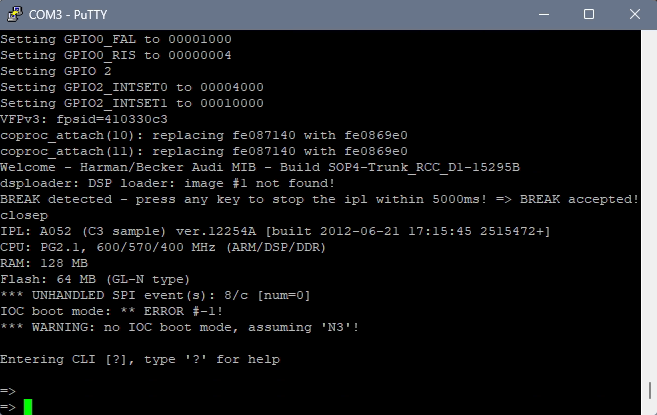
you have about 30 seconds to enter CLI commands (see the reference at the end of this article) After 30 seconds, IPL will close CLI and continue the booting. So be quick :)
- To boot ifs-emergency.ifs enter:
boot -t emerg
If [ifs-emergency.ifs](/MHI2 MHI2Q Harman Aisin/Recovery/RCC/How to mount RCC NOR fs0/How to boot ifs-emergency.ifs start blue emergency EFU/) partition is corrupted and does not boot, you can restore it via [zmodem](/MHI2 MHI2Q Harman Aisin/Recovery/RCC/How to boot ifs-emergency.ifs via zmodem in CLI/)
- Login to ksh shell with root and password
To find the password, take a look at the hash in shadow_rcc in m.i.b. SD in backup folder
then find the password by hash in Password_List_V4.0.pdf file located in the m.i.b. SD card.
Hint: copy the password with Ctrl+C and paste into putty window with the right mouse click
-
IMORTANT! Before you continue, make sure you are in the 2nd boot of Emergency IFS and [DevelperMode is enabled or MIBEmergency is slayed](/MHI2 MHI2Q Harman Aisin/Recovery/RCC/How to mount RCC NOR fs0/How to boot ifs-emergency.ifs start blue emergency EFU/)
-
After you logged in, check if RCC filesystem is mounted
stfu ; ls /dev/fs*if not, then mount it with following command:
/usr/bin/stop_efs_driver.sh && /sbin/devf-generic -s0x08000000,64M,,,128k,2,1 -r -D -P 1 -
Make sure the m.i.b. SD is inserted into SD1 slot. You can flash RCC stage2 like this (just replace the address to match your stage2 file in m.i.b. patches folder):
slay -9 MIBEmergency ; /net/mmx/fs/sda0/apps/sbin/flashunlock/net/mmx/fs/sda0/apps/sbin/flashit -v -d -x -a 0x00ba0000 -f /net/mmx/fs/sda0/patches/7807-ifs-root-stage2-0x00ba0000-EC5CCC00_FEC_CP.ifs &
If you connected your MIB on the table and enabled DeveroperMode of Emergency IFS but MIB still shuts down after 60 seconds by watchdog timer, then use your left hand to press [eject button of DVD drive](/MHI2 MHI2Q Harman Aisin/Recovery/RCC/Manually prevent shutdown by watchdog timer/) every 30 seconds. And by right hand do some activity in the console (for example enter date) to prevent auto logoff of ksh.
- When the flashing finished, just reboot and enjoy.
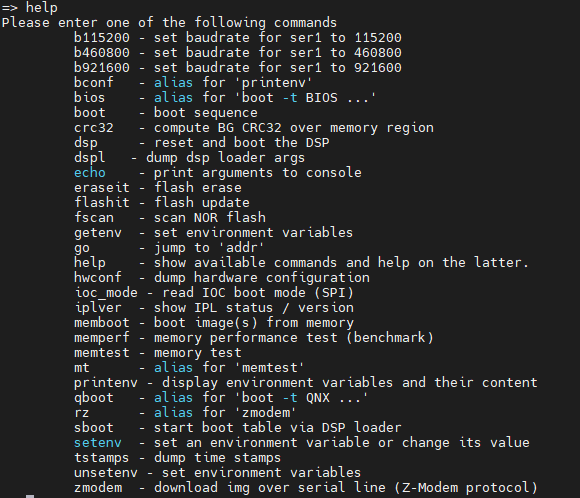
CLI command list reference
\